
When it comes the subject performance we always think of a way to prevent the execution of repetitive tasks.If we are capable of executing one task, and find a way to avoid the execution of the same task, this will save some time of computational processing. There are many ways of achieving that, and the first word that comes to our heads is “caching”
“Cache: A part of a computer’s memory where information is kept so that the computer can find it very quickly (Merriam-Webster Online Dictionary. Merriam-Webster, Incorporated. Retrieved 2 May 2011.)”
- Web Cache in Sitecore CMS: A Sitecore page is basically a group of “Renderings/sublayouts” altogether. Each rendering probably renders some HTML on the page, and these groups of HTML will be a Page. Some renderings have back-end logic, that makes your site dynamic and consumes some CPU and Memory. The Sitecore user is able to cache one desired rendering in order to improve the page performance. It´s also possible to enable Sitecore caching page by page instead of enabling it on the rendering itself.
In the Image below you can see the configuration of a rendering, and you can see some properties as well, the best practices suggest to use some of these like: “Vary by Data”, “Vary by Query String”.

The “Vary by Data” will cache a different HTML generated by accessing different items. The “Vary By Query String” will cache a different HTML if the query string changes.
There are many different caches, Sitecore provides a tool where you can see how much memory is in use or how much memory is allocated. You can try accessing your website using the following URL: http://yoursite.com/sitecore/admin/cache.aspx. This tool also provides you a way of reset all the caching in Sitecore, just click “Clear All” and all the cached information will be released.

Sometimes, even caching page renderings will be not enough, There are many websites that perform complex operations or simply execute too many times the same function on the code, let’s see how to perform a different type of caching
- Caching functions and objects: If you have multiples calls to a function, one approach that may consider is to cache the return of the function itself. Let’s suppose that you have a function that returns all the Events(GetAllEvents) from some data source, why call this data source some many times? if we can call just one and store the information for a while in the memory. In order to do that, some cache functions will be required.
Original Call

Cache implemented

You may also download this sample cache class here
- Caveats : If you are using Sitecore and your data source items are provided by the CMS, when the content editor creates a new “event item”, the list will be cached , and you will not be able to see the last event created, to avoid that issue you can use a verification like “IsPageEditor” or the expiration seconds param, in the sample below this value is set to 1800 seconds. you can also implement a verification to check if you are in “Page Editor Mode” the caching will be cleared(warning: this will work just on content author mode since you are not able to use Page Editor tool on a content delivery node). check the sample below.

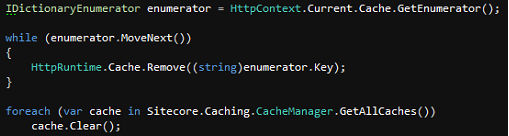
Another option would implement a page that clears the Server Side caching. You can create a Page in “/sitecore modules/PublicPages/Cache.aspx” , and the code below will clear this server-side cache:
Conclusion: Sitecore provides a very strong caching tool out of the box, it´s easy and brings good results. Caching server-side functions by the other hand can be tricky but maybe necessary. It should be implemented with caution to avoid the loss of some functionality. avoid using any type of caching on Payment Pages, or pages that contain sensitive information that cannot never be shared among users, There is a bunch of scenarios that you might be considering using the tools presented in this article and always remember of testing and on different scenarios before deploying to production.

 Sitecore Tips
You must be logged in to post a comment.