
If you come across a situation of generating a version for another language and for an Entire Sitecore tree, here you will find a good script that may help you
In the situation below, the script perform three main goals
- Create a new version in Korean
- Copy the content from English to Portuguese
- It will also include the subfolders
Discussion:
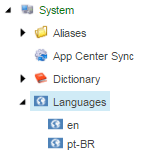
1)The script has the “en” as the source, and the “pt-BR” as a target, but maybe in your scenario, you are working with different languages. In this case, you need to find out the installed languages on the following Sitecore folder “/sitecore/system/Languages” it will look something like the image below.
2)You may ask the question, “Why copy the items from English to Portuguese”? This question is relevant, and the answer is: To help the Content Author on the translation. If all the content is empty, the Content Editor will find some difficulties in the translation.
3)Another important parameter on that is the recursion, this will take all children items from the specified folder
Get-ChildItem “/sitecore/content/Home” -Recurse | ForEach-Object { Add-ItemLanguage $_ -Language “en” -TargetLanguage “ko-KR” -IfExist Skip -IgnoredFields “” }In this case

 Sitecore Tips
You must be logged in to post a comment.