
Hi, Since the new Sitecore version was announced we are all installing Sitecore 9, and thanks to the community we can find some good articles explaining step by step with installing Sitecore9, but sometimes we find a small problem in the middle that can make things complicated, here Issues that you may face during your SC9 installation
1) “Cannot be loaded because the execution of scripts is disabled on this system”
So, you are very excited and then you are about to install Lazy Solar and you saw your first Error

How to solve that?
Run the following command
set-executionpolicy unrestrictedThe PowerShell will ask you if you want to apply, hit “A” to apply

Now let´s double check , run the following command
get-executionpolicyAfter you run this “get-executionpolicy” you should see “unrestricted”

2)JAVA FOLDER NOT Set
If you read the articles, you will now that your Java is a prerequisite , and if you open the Lazy Solr script, you will find some important parameters like $JREVersion = “1.8.0_152” and “JAVA_HOME”.
But sometimes you have the Java Installed, but the “JAVA_HOME” is an Environment Variable, maybe not configured and this will make your installation fail
So how to configure this Variable ?
First thing, open your cmd(run as administrator) and type
echo %JAVA_HOME%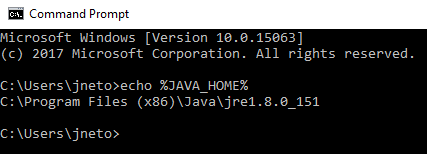
If you don´t see your Java Path there, you will need to configure this URL
so type
setx -m JAVA_HOME "C:\Progra~1\Java\jdk1.8.0_XX"and restart your Command Prompt
Type again echo %JAVA_HOME% and you should see the directory configured
There is also another way to perform that, you can use the Windows IDE for this as well
open control panel “edit the system environment” and look for “Environment Variables”
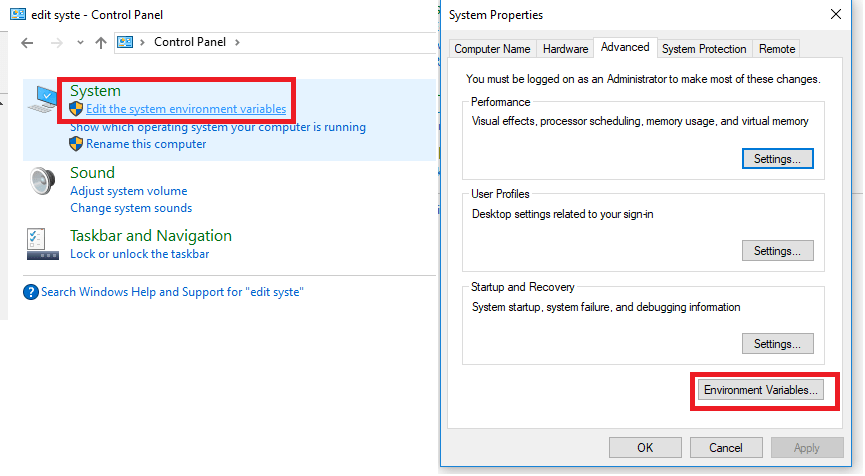
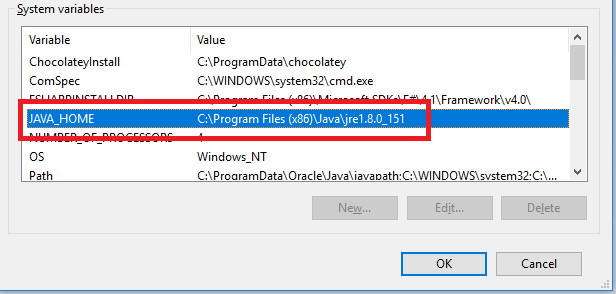
Check for the “JAVA_Home” directory, if you don´t have, click “new
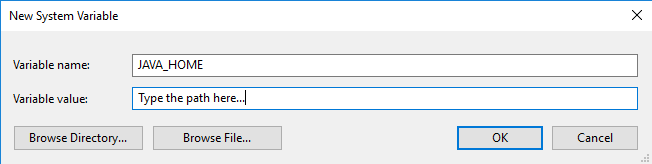
Add the new JAVA_HOME Variable and type the Path
3) IIS ISAPI and some additional Features
You already now that you must install Web Deploy and URL Redirect and a few other things , but there is also something that you may have missed
If you have a clean installation, maybe you IIS are pending some additional modules like the “ISAPI FILTERS” AND “ISAPI EXTENSIONS” that were not installed.
If you don´t have that already installed, your sc9 will break, so double check the following modules
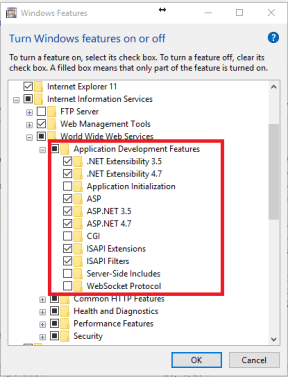
4) Error on xp0 Connect
After you performed the SC9 installation you tried to access https://xp0.xconnect/ and it gives you an Error!
I had this problem, and I asked Vinicius Deschamps who made a great contribution
Please check the post Below
5)Where the files are located?
You may have downloaded the files and put all the packages in your Desktop Folder, something like
C:\Users\myuser\Desktop\SC-9-Installation\Quick-steps\Sitecore 9.0.0 rev. 171002 (OnPrem)_single.scwdp
Well, SC9 Packages has a very long name, and this will give you errors if the directory name exceeds 255 unless you enable it, so to avoid that issue, create your SC9 installation on your C:\SC9, try to keep a very small name for that!
6)Failed to start service “Sitecore XConnect Search Indexer”
This issue is caused by your license file, you don´t have the one that will support SC9 entirely, try to get a new one!
7)”Unable to connect to master or target server “sc90_Processing.Pools”
In order to solve this issue, Please read the detailed post below
https://www.sitecorespark.com/blog/2017/11/sitecore-installation-framework-error-processing-pools
8) “The SQL provider cannot run because of a missing dependency”
Open your cmd.exe (as administrator)
This Issue can be solved the following commands
C:\Program Files (x86)\Microsoft SDKs\Windows\v7.0A\Bin\x64\gacutil” /i “C:\Program Files (x86)\Microsoft SQL Server\140\Tools\Binn\ManagementStudio\Extensions\Application\Microsoft.SqlServer.TransactSql.ScriptDom.dll”
You can see a detailed description of the issue here
Well, those are issues that I faced during the installation of SC9 in two separated machines, one in a clean environment, and one with a lot of things already set there, I hope this helps you
Thank you

 Sitecore Tips
You must be logged in to post a comment.