
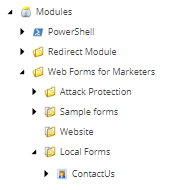
Sometimes you need to save some time, and the copy and paste seems to be the alternative, In this scenario, you duplicated a WFFM Form, the “contact us ” form
/sitecore/system/Modules/Web Forms for Marketers/Local Forms
And all the fields come together, the form shows up, everything seems ok, BUT! you receive the email with no content ! like the image below
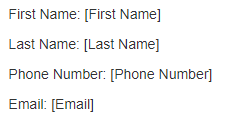
So, for some Reason, the WFFM is not putting the content on the field, where it should be!
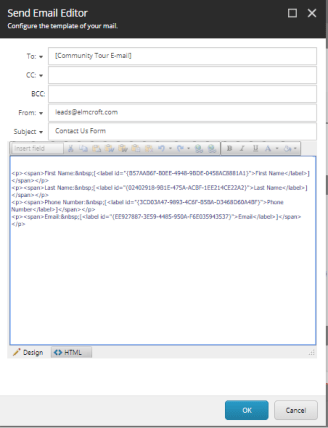
UNDERSTANDING THE ISSUE :
When you Copy the form, every field will have a new ID , but, on the “Send Email” action, those IDs will not be automatically updated, and WFFM will fail to get the content because the IDS are wrong!
SOLUTION:
Remove all the fields, and insert it all again!
How? click on the Sitecore Form Item, and then the Ribbon will show to you the “forms tab”,
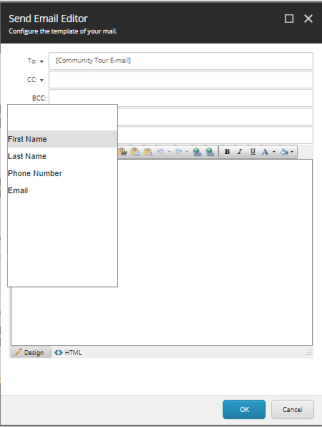
Click on “Save Actions” – > “Send Email Message” – > Edit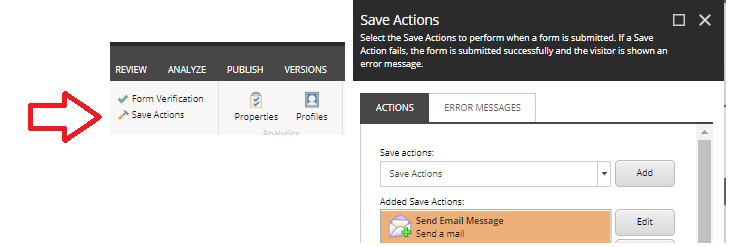
now Manually remove the fields and insert it again!

 Sitecore Tips
You must be logged in to post a comment.