
As usual, working life involves handling various projects—every month installing new instances of Sitecore on your local machine, until one day there’s no more space left, and you have to rush to figure out how to free some up, since most of the time, upgrading the hard drive won’t be an immediate option
The first tip is to install a program similar to “TreeSize Tree”, a program that exists as much as we are using space on the machine, and thus helps to identify bottlenecks or overuse, which can be optimized, in this case, we delete the files!
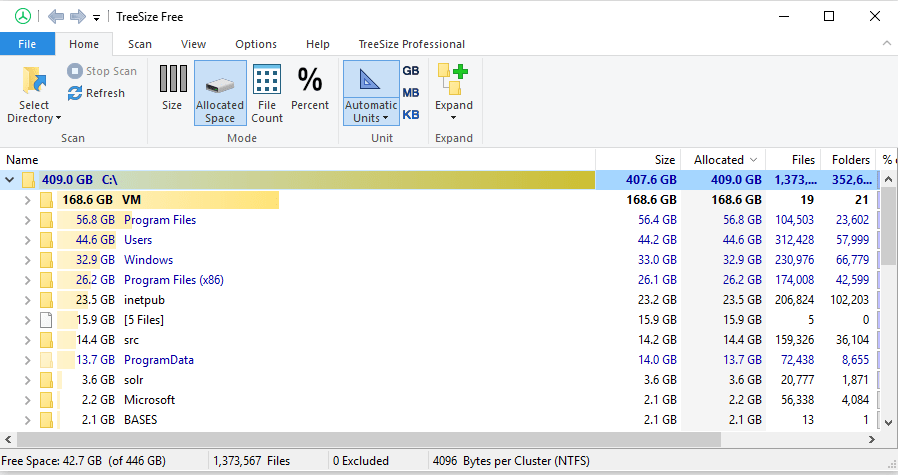
In our investigation, we will use the following example
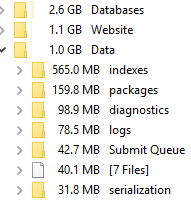
Some folder are easily detected, and probably are subject for cleaning
- Package Folder
- Logs
Those folders might not be necessary for local instances and can likely be deleted.
In this example, the “inetpub” folder alone holds 23.5 GB of files. Now imagine repeating this cleanup process across all your Sitecore instances.
Continuing our investigation, we can open the Folder where the databases are there and check for the log files, SQL Log files are usually big, and we don’t notice their size until they are already too big.
The web and Master Database log can be the “shrink” command.
A good and old code, but very useful still the shrink command, note, that the Logical physical name can be different Logical name(“Mywebsite_Sitecore_Web”, “‘Sitecore.Web_log'”) and this is very common if you imported other Sitecore databases from other instances, like QA, or Production
USE Mywebsite_Sitecore_Web;
GO
— Truncate the log by changing the database recovery model to SIMPLE.
ALTER DATABASE ElmcroftSitecore_Web
SET RECOVERY SIMPLE;
GO
— Shrink the truncated log file to 1 MB.
DBCC SHRINKFILE (‘Sitecore.Web_log’, 1);
GO
— Reset the database recovery model.
ALTER DATABASE MyWebsiteSitecore_Web
SET RECOVERY FULL;
GO
Check also the folder “website\upload” , once on a server, a figure out that there was holding the backup of all deployed versions, and that helped to end the server space very quickly.
Another important folder to check is the “C:\Windows\Temp” which usually accumulates a lot of files that and also can reflect errors on your Sitecore instance. If this folder has more then 65k, Sitecore will show an error when installing a Sitecore Package
System.IO.__Error.WinIOError(Int32 errorCode, String maybeFullPath) System.IO.Path.GetTempFileName()
This error can be simply solved by deleting the files on that folder.
Keep in mind those tips, and perform some cleaning on your files regularly, before you run out of space.

 Sitecore Tips
You must be logged in to post a comment.