Hello,
In this topic we will discuss about some concepts combined
Sitecore Precompilation + Custom Theme Engine For Sitecore
First we need discuss about Precompilation:
What is precompilation and what is the benefits ?
Precompilation will basically make your cshtml into a binary file, so , instead of compilation of the view happen at run time, it will happen before, so and it will lighten the load on the server. the final result? The start up of your website will be faster. reducing the warm up time of your application
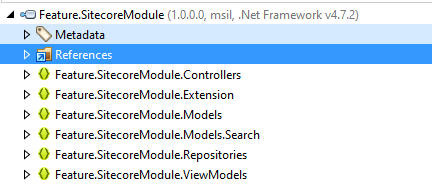
In the image below shows a binary file being decompiled by , and we don’t see any traces of precompilation , this is how your project should be for now
How to Enable Precompilation in a Sitecore Project ?
There are some techniques, however here, we will use “RazorGenerator”
On Visual Studio, Open Nuget and look for the following Package RazorGenerator.MsBuild and install the package

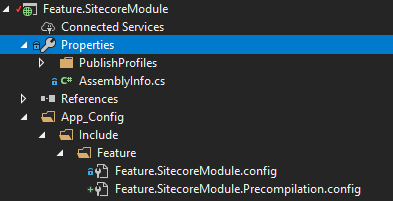
Let’s create a new patch file named “Feature.SitecoreModule.Precompilation.config” and add to the project
<configuration xmlns:patch="http://www.sitecore.net/xmlconfig/">
    <sitecore>
        <mvc>
            <precompilation>
                <assemblies>
                    <assemblyIdentity name="Feature.SitecoreModule" />
                </assemblies>
            </precompilation>
        </mvc>
    </sitecore>
</configuration>
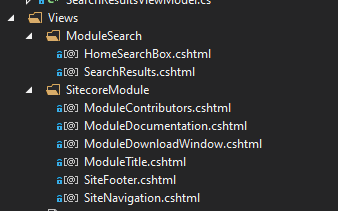
Currently our projects contain several views as we can see below
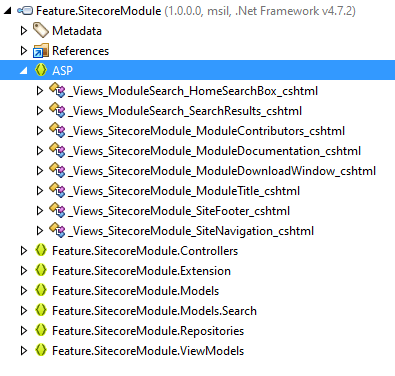
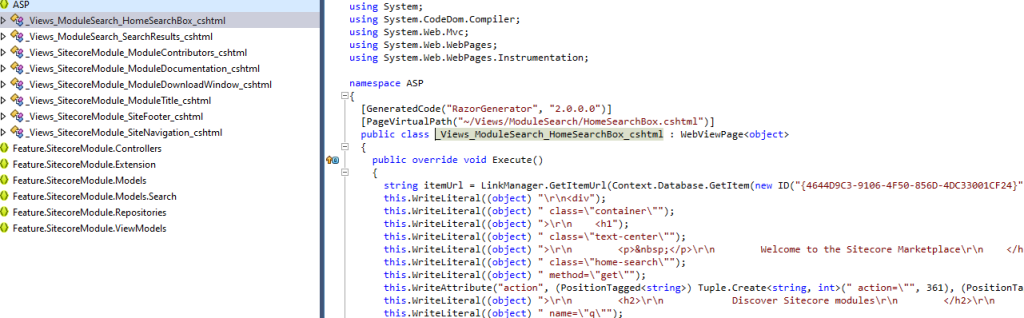
Build and deploy your project and let’s inspect the binary once again, the image below shows has a new section called “ASP”. and the names matches our views files.
IMPACT FOR THE DEVELOPERS:
A traditional Sitecore project will involve a lot of changes on the views(.cshtml), which most of the times, the developer will deploy ONLY THE VIEW, on his local Sitecore instance, helping the speed of the development. However, with the precompilation enabled, it will bring a caveat, because of this, the change on .cshtml will not cause any effect, and the developer must deploy the binary file as well ?
How to overcome that?
First Approach : Include ” Mvc.UsePhysicalViewsIfNewer” :
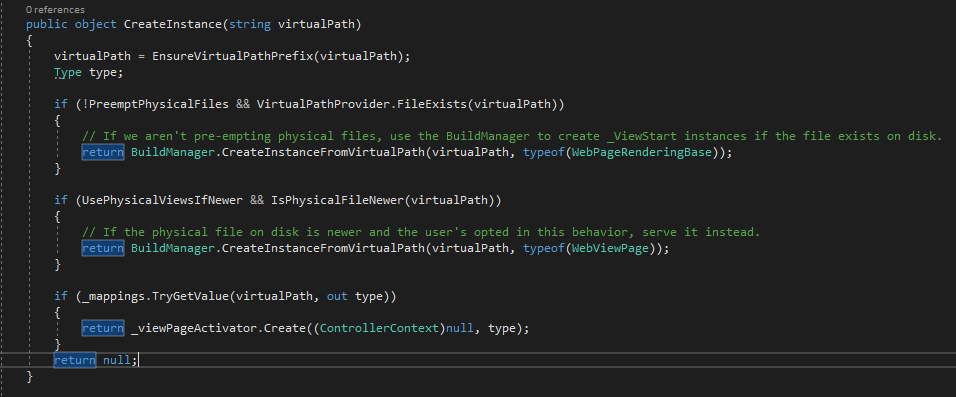
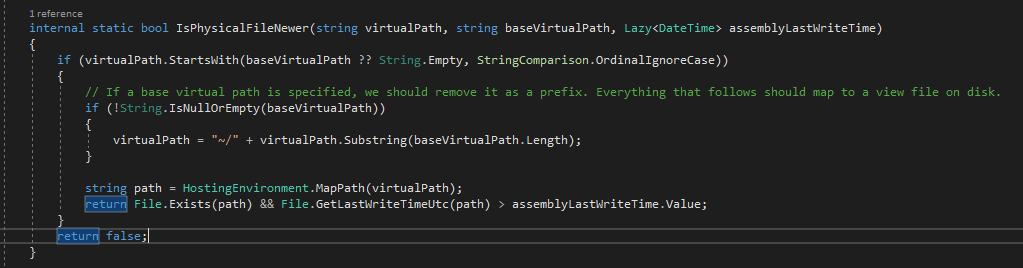
The name of the parameter stands for it’s own, this will make the View engine check the date of the binaries and the cshtml and it will choose between one or another. However, this parameter will make your ViewEngine to make this comparison. for a Dev environment it’s bearable , however if you looking to speed up your Production environment, this does seems to be the best approach.
<configuration xmlns:patch="http://www.sitecore.net/xmlconfig/">
    <sitecore>
        <mvc>
            <precompilation>
                <assemblies>
                    <assemblyIdentity name="Feature.SitecoreModule" />
                </assemblies>
            </precompilation>
        </mvc>
   <settings>
      <setting name="Mvc.UsePhysicalViewsIfNewer" value="true" />
    </settings>
    </sitecore>
</configuration>
Let’s take a look deeply in RazorGenerator DLL, so we can understand where this action takes places
Second Approach : Use Server role and disabled Precompilation for dev
In this approach we will change the .xml configuration file and add the following env:require=”!dev”
This will disabled the precompilation on dev environments and force the View Engine to get directly from the .cshtml files
Where the environment role is define ? It will be in web.config

For additional information, check Sitecore documentation on How to Specify the server role
The config below, will enable/Disable precompilation based on Environment , in this case, it will disable for dev environments.
<configuration xmlns:patch="http://www.sitecore.net/xmlconfig/">
    <sitecore>
        <mvc>
            <precompilation>
                <assemblies>
                    <assemblyIdentity name="Feature.SitecoreModule" env:require="!dev" />
                </assemblies>
            </precompilation>
        </mvc>
    </sitecore>
</configuration>
Theming
What is a Theme , and how to create that?
Let’s say that you wanna implement a Multisite, which means that you will have a lot of websites on your Sitecore Project, However, you wanna to take advantage of the existing code.
Supposed that you have a Footer, However, in this new Website, the footer will have small changes on .cshtml File. In this case you don’t necessary need to Create a new Rendering, a New Controller, the difference it’s just the view. and in order to achieve the reusability of code, you can use RazorGenerator, Implement a Custom View Engine, and switch to this view at runtime . so what you can do is to override an existing cshtml for a new one.
How to implement a CustomViewEngine ?
If you ARE NOT USING PRECOMPILATION, Use the code provided By Himadri has an example of implementation based on “RazorViewEngine”, this code will switch (override) the cshtml in runtime, basically switching the original “SiteFooter.cshtml” file to the new modified version.
However, If you are using Precompilation we will use the same code, BUT with some changes . We need to Implement a “Custom View Engine” based on “PrecompiledMvcEngine” class that comes from RazorGenerator as well. However the difference is the code will switch from a precompiled view to a precompile view in runtime.
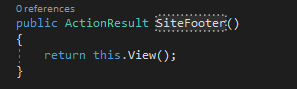
On the controller we have a code that will return the view, and after this , our Custom View Engine will be fired (method FindView), and perform the switch between the precompiled views.
PrecompiledMVCEngine requires a different start up from RazorViewengine , in this case, we will use “PostApplicationStartMethod” instead of “PreApplicationStartMethod”
class: RazorGeneratorMvcStart.cs : This class will be used to intercept the code every time your controller Returns a View.
using RazorGenerator.Mvc;

[assembly: WebActivatorEx.PostApplicationStartMethod(typeof(Feature.SitecoreModule.Themes.RazorGeneratorMvcStart), "Start")]

namespace Feature.SitecoreModule.Themes {
    public static class RazorGeneratorMvcStart {
        public static void Start() {
            var engine = new CustomViewEngine(typeof(RazorGeneratorMvcStart).Assembly) {
                UsePhysicalViewsIfNewer = HttpContext.Current.Request.IsLocal
            };

            ViewEngines.Engines.Insert(0, engine);

            // StartPage lookups are done by WebPages.
            VirtualPathFactoryManager.RegisterVirtualPathFactory(engine);
        }
    }
}
Now , we will implement the CustomViewEngine, however, instead of being based on RazorViewEngine, we will use PrecompiledMvcEngine.
The constructor also needs to change, as displayed in the code below
 public class CustomnViewEngine: PrecompiledMvcEngine
    {
        public CustomViewEngine(Assembly assembly) : base(assembly)
        {
            var baseThemeName = Sitecore.Configuration.Settings.GetSetting("BaseThemeName");
            Assert.ArgumentNotNullOrEmpty(baseThemeName, "BaseThemeName");
            ViewLocationFormats = new string[]
            {
                "~/Themes/" + baseThemeName + "/Views/{1}/{0}.cshtml",
                "~/Themes/" + baseThemeName + "/Views/Shared/{0}.cshtml"
            };
            PartialViewLocationFormats = new string[]
            {
                "~/Themes/" + baseThemeName + "/Views/{1}/{0}.cshtml",
                "~/Themes/" + baseThemeName + "/Views/Shared/{0}.cshtml"
            };
        }

        public override ViewEngineResult FindView(ControllerContext controllerContext, string viewName, string masterName, bool useCache)
        {
            if (controllerContext == null)
                throw new ArgumentNullException(nameof(controllerContext));
            if (string.IsNullOrEmpty(viewName))
                throw new ArgumentException("viewName");
            if (!string.IsNullOrEmpty(masterName))
            {
                throw new ArgumentException("ViewEngine doesn't support request specific master page.");
            }
            string controllerName = controllerContext.RouteData.GetRequiredString("controller");
            var controllerFullName = controllerContext.Controller.GetType().FullName.ToLower();
            var isSitecoreView = controllerFullName.Contains("sitecore");
            //If a direct view link or a sitecore view let the razorview handle it
            if (viewName.Contains("/") || isSitecoreView)
            {
                return base.FindView(controllerContext, viewName, masterName, useCache);
            }
            var currentSite = Sitecore.Context.Site;

            if (currentSite.Properties["themeChain"] == null)
            {
                throw new Exception("The website parameter themeChain is missing");
            }
            var themeChain= currentSite.Properties["themeChain"].Split('|').Reverse().ToList();
            if (themeChain.Any())
            {
                foreach (var theme in themeChain)
                {
                    var viewPath = $"~/themes/{theme}/views/{controllerName}/{viewName}.cshtml";
                    var absolutePath = HttpContext.Current.Server.MapPath(viewPath);
                    if (System.IO.File.Exists(absolutePath))
                    {
#if (DEBUG)
                        Log.Info($"View {viewName} found in {theme}.", "ViewEngine");
#endif
                        return new ViewEngineResult(this.CreateView(controllerContext, viewPath, string.Empty), (IViewEngine)this);
                    }
                    //If the view file doesn't exists in the folder look at the shared folder
                    viewPath = $"~/themes/{theme}/views/shared/{viewName}.cshtml";
                    absolutePath = HttpContext.Current.Server.MapPath(viewPath);
                    if (System.IO.File.Exists(absolutePath))
                    {
#if (DEBUG)
                        Log.Info($"View {viewName} found in Shared of theme {theme}.", "ViewEngine");
#endif
                        return new ViewEngineResult(this.CreateView(controllerContext, viewPath, string.Empty), (IViewEngine)this);
                    }
                }
            }
            return base.FindView(controllerContext, viewName, masterName, useCache);
        }

        public override ViewEngineResult FindPartialView(ControllerContext controllerContext, string partialViewName, bool useCache)
        {
            if (controllerContext == null)
                throw new ArgumentNullException(nameof(controllerContext));
            if (string.IsNullOrEmpty(partialViewName))
                throw new ArgumentException("partialViewName");
            string controllerName = controllerContext.RouteData.GetRequiredString("controller");
            var controllerFullName = controllerContext.Controller.GetType().FullName.ToLower();
            var isSitecoreView = controllerFullName.Contains("sitecore");
            //If a direct view link or a sitecore view let the razorview handle it
            if (partialViewName.Contains("/") || isSitecoreView)
            {
                return base.FindPartialView(controllerContext, partialViewName, useCache);
            }
            var currentSite = Sitecore.Context.Site;
            var themeChain = currentSite.Properties["themeChain"].Split('|').Reverse().ToList();
            if (themeChain.Any())
            {
                foreach (var theme in themeChain)
                {
                    var viewPath = $"~/themes/{theme}/views/{controllerName}/{partialViewName}.cshtml";
                    var absolutePath = HttpContext.Current.Server.MapPath(viewPath);
                    if (System.IO.File.Exists(absolutePath))
                    {
#if (DEBUG)
                        Log.Info($"View {partialViewName} found in {theme}.", "ViewEngine");
#endif
                        return new ViewEngineResult(this.CreateView(controllerContext, viewPath, string.Empty), (IViewEngine)this);
                    }
                    //If the view file doesn't exists in the folder look at the shared folder
                    viewPath = $"~/themes/{theme}/views/shared/{partialViewName}.cshtml";
                    absolutePath = HttpContext.Current.Server.MapPath(viewPath);
                    if (System.IO.File.Exists(absolutePath))
                    {
#if (DEBUG)
                        Log.Info($"View {partialViewName} found in Shared of theme {theme}.", "ViewEngine");
#endif
                        return new ViewEngineResult(this.CreateView(controllerContext, viewPath, string.Empty), (IViewEngine)this);
                    }
                }
            }
            return base.FindPartialView(controllerContext, partialViewName, useCache);
        }
    }
If we analyze the code, we will notice the method this.CreateView , will look for the precompiled View and return it , However, in order to fully understand what is going on, we must dig and check this method on RazorGenerator
The method “CreateViewInternal” will search inside “_mappings” and if locate the precompiled View it will return, Otherwise you will received an Runtime error , “Null” on your code

Good luck !
Additional discussion:
https://stackoverflow.com/questions/49399800/razorviewengine-findview-cant-find-the-precompiled-view
https://jermdavis.wordpress.com/2018/04/02/an-interesting-side-effect-of-compiled-views/

 Sitecore Tips
You must be logged in to post a comment.