Hello there!
Sitecore xDB is one of my favorite tools in the Sitecore ecosystem, but like any powerful engine, it needs regular tune-ups to keep it running smoothly. Left unchecked, index fragmentation and database bloat can slow down your analytics, degrade your user experience, and even cause unexpected outages.
So, where do you begin your xDB health check? A great first step is to identify fragmented indexes. Run the query below against your xDB database to report on each table and index’s fragmentation percentage and page count:
SELECT S.name as 'Schema',
T.name as 'Table',
I.name as 'Index',
DDIPS.avg_fragmentation_in_percent,
DDIPS.page_count
FROM sys.dm_db_index_physical_stats (DB_ID(), NULL, NULL, NULL, NULL) AS DDIPS
INNER JOIN sys.tables T on T.object_id = DDIPS.object_id
INNER JOIN sys.schemas S on T.schema_id = S.schema_id
INNER JOIN sys.indexes I ON I.object_id = DDIPS.object_id
AND DDIPS.index_id = I.index_id
WHERE DDIPS.database_id = DB_ID()
and I.name is not null
AND DDIPS.avg_fragmentation_in_percent > 0
ORDER BY DDIPS.avg_fragmentation_in_percent desc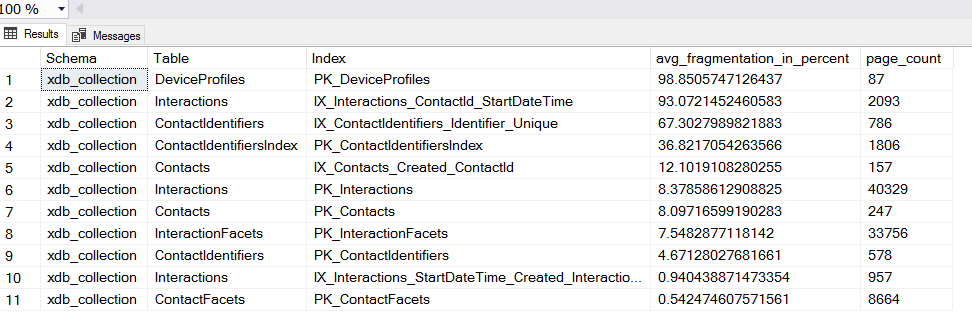
Although only a handful of indexes are currently fragmented, imagine if that fragmentation spread across the majority of your data structures: you’d quickly see sluggish storage procedures, slower query response times, and ultimately a drag on the real time analytics xDB is built to deliver. Fragmented indexes force SQL Server to work harder, scanning extra pages, jumping between noncontiguous data, and consuming more I/O, so any fragmentation beyond a modest threshold (typically 10–30% avg_fragmentation_in_percent) can have an outsized impact. To safeguard your xDB performance, identify all indexes with high fragmentation and schedule a rebuild (or, for moderate fragmentation, a reorganize). By doing so, you’ll restore page contiguity, reduce I/O overhead, and keep your Experience Database running at peak efficiency.
How long should we store contacts/interactions?
Effective data retention is critical for balancing analytical insights with compliance and system performance. In Sitecore xDB, both contacts (unique visitor profiles) and interactions (individual visits, events, and page views) are persisted in xConnect and the underlying storage . By default, Sitecore does not purge these records automatically, so without an explicit retention policy, your database will grow indefinitely affecting the performance of the database.
First, let’s inspect how many interactions we have between the years 2021-2025
SELECT
  YEAR(StartDateTime)           AS InteractionYear,
  COUNT(*)                      AS InteractionCount

FROM [xdb_collection].[Interactions]
WHERE YEAR(StartDateTime) BETWEEN 2021 AND 2025
GROUP BY YEAR(StartDateTime)
ORDER BY InteractionYear;
GO
The result below is just for one Shard, remember that we have start with 2
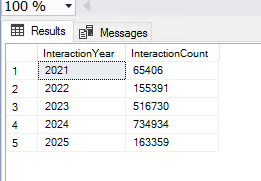
As we can see there are a lot of interactions per year, but how many interactions per user? This will give us a better idea
How many interactions
A high volume of interactions can signal that your database needs maintenance. The query below retrieves the top 100 users by interaction count, if any exceed 1,000 interactions, XDB performance will begin to suffer, indicating it’s time for a cleanup.
SELECT TOP(100)
    c.ContactId,
    COUNT(i.InteractionId) AS InteractionCount
FROM xdb_collection.Interactions AS i
INNER JOIN xdb_collection.Contacts     AS c
    ON i.ContactId = c.ContactId
GROUP BY
    c.ContactId
ORDER BY
    InteractionCount DESC;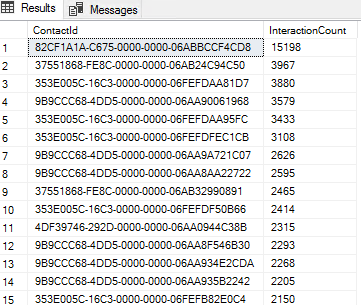
In the image above, we can see a lot of contacts with more than 1k interactions, Therefore, we need to do something.
Well, we will need to clean up some interactions!
Cleaning up
In Sitecore 10.4 there are a few ways of doing that, the best is using the out-of-the box tool named:
“xConnect Purging Tool” : This allows you to specify if you want to delete contacts, interactions, define a cut off date
In the example below, I execute the following
The command above will keep the last 800 days(around 26 months) of data
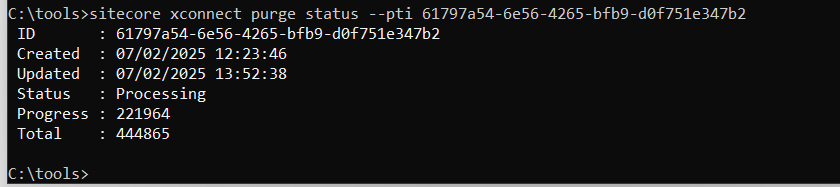
sitecore xconnect purge interactions start -d 800Now, I will check the status of the task, it will take some time to run, by time I mean a few hours In a production environment
By retaining only the essential data in your xDB, you’ll prevent server overload and ensure optimal performance.
Good luck !
Sources:

 Sitecore Tips
You must be logged in to post a comment.