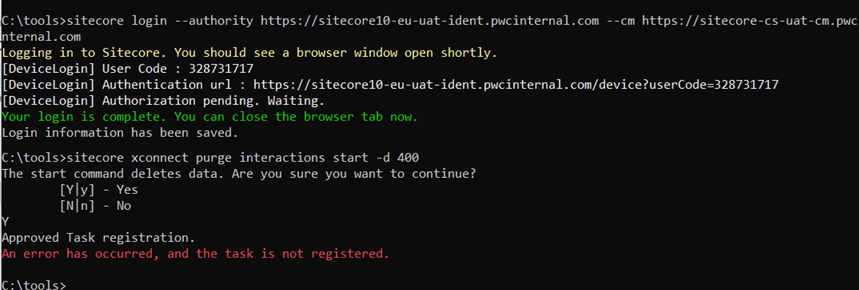
When working with Sitecore 10.4 and running the xConnect Purging Tool, you might come across the following error:
“An error has occurred, and the task is not registered”
This usually prevents the purging task from starting, leaving your xDB cleanup stuck. In most cases, the root cause lies in certificate configuration issues.
Root Cause
The purging tool relies on secure communication with xConnect. If certificates are misconfigured, such as missing permissions, duplicate entries, or misplaced non-self-signed certificates, the purge task fails to register properly.
How to Fix It
Here’s the step-by-step process we followed to resolve the issue:
1. Grant Certificate Access
Ensure that the following Sitecore service accounts have access to the certificate private keys in the following roles: (check https://errorcotidianam.wordpress.com/2025/02/02/the-ultimate-guide-for-sitecore-ssl-issues/) Step 4, for additional details on this step
CMCortexProcessing
2. Remove Duplicate Certificates
Duplicate intermediate or intermittent certificates can cause conflicts. Clean them up so that only the valid certificates remain.
3. Move Non-Self-Signed Certificates
Sometimes, non-self-signed certificates end up in the Root store when they should be in the CA store. You can identify and move them with PowerShell:
Find non-self-signed certificates in the root folder:
Get-Childitem cert:\LocalMachine\root -Recurse | Where-Object {$_.Issuer -ne $_.Subject}Get-Childitem cert:\LocalMachine\root -Recurse | Where-Object {$_.Issuer -ne $_.Subject}
Move them into the CA store:
Get-Childitem cert:\LocalMachine\root -Recurse | Where-Object {$_.Issuer -ne $_.Subject} | Move-Item -Destination Cert:\LocalMachine\CA4. Restart the Purging Task
After fixing the certificate issues, restart the purging task. The command should now register correctly and start running.
Final Notes
If you encounter "An error has occurred, and the task is not registered", the problem is almost always certificate-related. Double-check:
- Service accounts have the right certificate permissions.
- No duplicate certificates exist.
- Non-self-signed certificates are placed correctly.
Once these are fixed, the purging task will run without error and allow you to keep your xDB clean and performant.

 Sitecore Tips