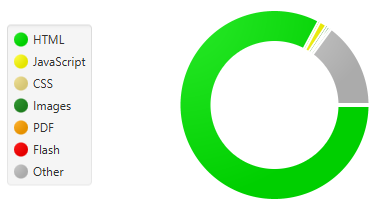
The ranking on search engine’s is even more important every day, as a Marketing Specialist, you should be aware of common problems faced using the Sitecore Plataform. Those issues can have an impact on your website and if you want to check if this is affecting your website, you can download the following tool, or similar, such as Screaming FROG Seo Spider Tool, there are many other tools available in the market as good as this, and also some Chrome add-ons that can do that.
Url Canonical : Sometimes one Sitecore Item can be accessed in multiple ways, that is where the canonical URL play his role to help the Search Engine to find the correct URL
On Google chrome hit :
view-source:https://www.yourwebsite.com and look for the following tag
<link rel=”canonical” href=”https://www.mywebsite.com” />
If you don’t have this implementation on your Website, I recommend a good blog post with the code already included: http://prafuljangid.blogspot.com/2015/07/canonical-url-for-sitecore-items.html
Avoiding the duplicate Pages : This situation can happen and should be treated. the example below, both HTTP and HTTPS page are available, so forcing into HTTPS could be a solution
This patch will force all URLs from http -> https
<rule name=”HTTP to HTTPS redirect” stopProcessing=”true”>
<match url=”(.*)” />
<conditions>
<add input=”{HTTPS}” pattern=”off” ignoreCase=”true” />
</conditions>
<action type=”Redirect” redirectType=”Found” url=”https://{HTTP_HOST}/{R:1}” />
</rule>
But sometimes, you may have Multiple sites , or one in China without the SSL Implementation, so in this case , you cannot redirect ALL request. The Patch below, will only be applied if it hits the pattern “mywebsite.com”, this implementation would be more selective.
<rule name=”Redirect HTTP to HTTPS WWW ” enabled=”true” patternSyntax=”ECMAScript” stopProcessing=”true”>
<match url=”(.*)” />
<conditions logicalGrouping=”MatchAll” trackAllCaptures=”false”>
<add input=”{HTTP_HOST}” pattern=”(^mywebsite.com)” />
</conditions>
<action type=”Redirect” url=”https://www.{C:1}{REQUEST_URI}” logRewrittenUrl=”true” appendQueryString=”false”/>
</rule>
Trailing Slash : This is very common and can also be fixed
<rule name=”Add Trailing Slash” stopProcessing=”true”>
<match url=”(.*[^/])$” />
<conditions>
<add input=”{REQUEST_METHOD}” matchType=”Pattern” pattern=”GET” ignoreCase=”true” negate=”false” />
<add input=”{REQUEST_FILENAME}” matchType=”IsDirectory” negate=”true” />
<add input=”{REQUEST_FILENAME}” matchType=”IsFile” negate=”true” />
<add input=”{REQUEST_FILENAME}” pattern=”\.\w{2,4}($|\?)” negate=”true” />
<add input=”{REQUEST_URI}” pattern=”[?]” negate=”true” />
</conditions>
<action type=”Redirect” url=”{R:1}/” appendQueryString=”false”/>
</rule>
404 Issue: Sitecore has a problem that does not actually return a 404 directly, but it will return a code 302 before 404 and this may affect the SEO of your website. It still affects Sitecore.
Plataform independent Issues :
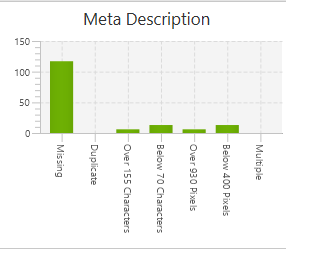
Page Title/Meta Description : Using a SEO Tool you can analyze your website and check for the Meta Description field, you can identify if it’s missing or duplicated, this will count to add or remove points on your website
 Size of Images : Big images can affect the performance of the overall site, this is more important if the user is under a Mobile connection with a poor signal, the experience on the website can frustrate the user. So remember to analyze the Site of the images

Image Alternate Tags : This is particular important for user useful for users that uses screen readers applications . The alt=”Logo Image” play a very important role some users.
Trackers: Once a website is online, one main important task is the promotion. Reaching a good number of users is the main goal, otherwise, the website becomes useless. The only way to obtain this kind of information is to track your website. Tracking website helps you identify the best pages, and separate the wheat from the chaff.
To identify if the trackers are correctly running on your page I recommend “Ghostery” , this tool can be installed on Google Chrome as a browser Extension.

 Sitecore Tips
You must be logged in to post a comment.